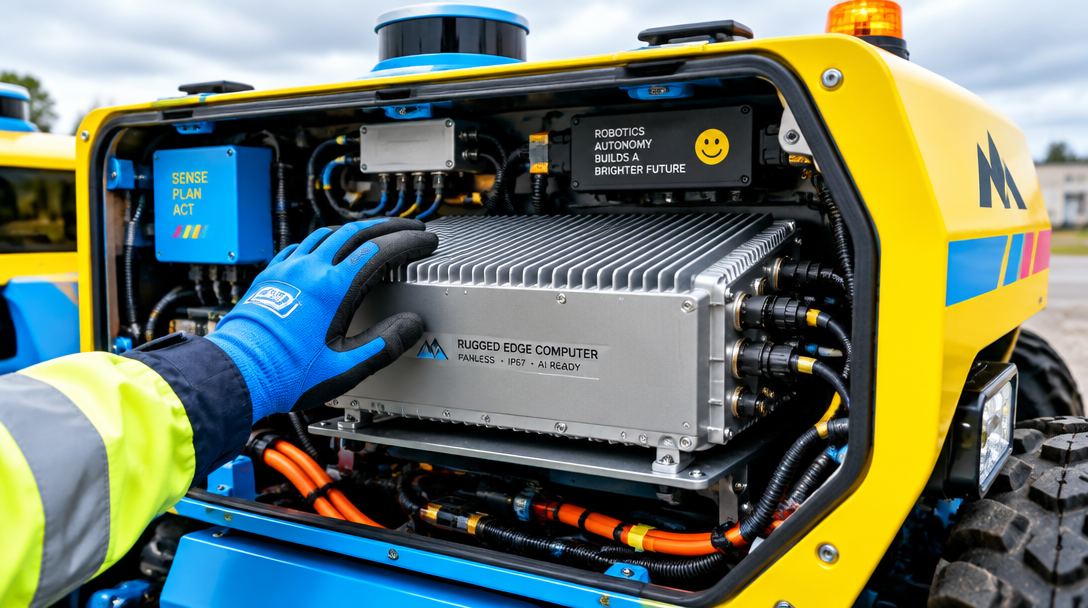
To ruggedize edge computing hardware for autonomous robots, start with a fanless, cableless architecture to eliminate common failure points, then match the processor to the robot's actual AI workload so performance, heat, and power stay balanced. This combination ensures low-latency local processing, resilience to shock, vibration, temperature swings, and unstable power, and continued operation when disconnected.
How do you ruggedize edge computing hardware for autonomous robots?
Ruggedize the edge computer by starting with a fanless, cableless architecture, then match the processor to the robot's actual AI workload so performance, heat, and power stay in balance. That combination matters because robots need low-latency local processing, often must keep running when disconnected, and may operate under shock, vibration, temperature swings, and unstable power.
Start with the failure points, not the processor brochure
- Start with the failure points, not the processor brochure
A robot can tolerate a lot of complexity in software. It is far less forgiving about one loose connector or one dead fan.
That is why the first design move is architectural. Industrial computers use fanless and cableless designs to enable ruggedized operation. The reason is plain: fans are a common failure point, and they create a single-failure vulnerability. If the cooling system depends on one moving part, that part quietly becomes part of your safety and uptime story.
Cableless design matters for the same reason. A cable looks trivial on a bench. On a vehicle or mobile robot, it lives through vibration, repeated starts and stops, temperature changes, and maintenance handling. Remove the cable and you remove the chance that this one small thing works loose at the wrong moment.
If you are reviewing an existing platform, do not begin by asking how much AI throughput you can add. Ask a simpler question: what single component can stop this system cold? If the answer includes a fan or an internal cable, you have found the first place to redesign.
Use fanless cooling because it changes the whole enclosure
- Use fanless cooling because it changes the whole enclosure
The usual way to describe fanless computing is as a durability feature. That is true, but incomplete. Fanless cooling changes what the whole machine can be.
With passive cooling, the chassis can remain fully enclosed. That enclosed chassis is what allows a wide operating temperature range, resistance to shock and vibration, and support for a broad power input range. Those are not separate perks stacked on top of one another. They come from the same decision to remove active cooling and keep the enclosure sealed.
This is the non-obvious turn that matters in robotics. A fanless design does not merely survive harsh conditions better. It creates the conditions for the rest of the system to behave predictably. Once the box stays closed, dust and debris have fewer paths in, airflow stops being a dependency, and the mechanical design gets simpler. Reliability stops being an accessory and becomes the frame around every other choice.
A quick thought experiment helps. Imagine two edge computers mounted on an autonomous vehicle. Both can run the same model on day one. One relies on a fan and internal cabling. The other uses passive cooling in a fully enclosed chassis. After enough vibration, heat cycling, and field handling, only one of those designs still has the same internal assumptions it had on the workbench.
Keep compute local when the robot cannot wait
- Keep compute local when the robot cannot wait
Autonomous robots do not have much patience for round trips.
Edge computing in robotics means processing data on or near the robot. The practical benefits are immediate: lower latency, less dependence on the cloud, and continued operation in disconnected environments. For autonomous vehicles and similar systems, edge computers may need to process, analyze, and make decisions in as little as a millisecond. Whether your own application sits exactly at that number or not, the design implication is the same: the robot cannot afford a compute path that depends on remote availability.
This changes how you think about ruggedization. A rugged enclosure is only half the job. The compute path also has to be rugged against network absence. If loss of connectivity turns a capable robot into a stalled one, the system is still fragile.
When you map your platform, separate tasks into two groups. The first group must happen locally because control, perception, or safety cannot wait. The second group can tolerate delay, batching, or later synchronization. Put the first group on the edge computer without compromise. Treat everything else as optional in the moment.
Size the processor for the mission, not for peak ego
- Size the processor for the mission, not for peak ego
A common mistake in edge robotics is to over-spec the processor and under-spec the thermal plan.
Hardware-software co-optimization is the useful discipline here. The idea is to choose the processing unit that gives the right performance per watt for the actual robotic application. That may be a low-power GPU, a specialized AI accelerator, or a neuromorphic chip. The choice directly affects how efficiently the system can run AI workloads, and it also changes thermal generation and battery drain.
That sentence sounds abstract until you put it on a mobile machine. Every extra watt becomes heat that must go somewhere, and on a battery-powered robot it also becomes less runtime. In a fanless system, heat does not disappear into forced airflow. It moves into the chassis and the surrounding environment. So the processor decision is also a cooling decision, a battery decision, and in many cases a mechanical packaging decision.
The naive rule says to buy the fastest available compute module and leave headroom. That rule fails quickly in rugged edge systems. A bigger processor may raise thermal output enough that the sealed chassis becomes harder to cool, or battery life drops, or sustained performance falls because the system must protect itself under load. The faster part can produce a slower robot once the mission lasts longer than a short demo.
Co-optimize hardware and software before you lock the enclosure
- Co-optimize hardware and software before you lock the enclosure
Engineers often treat hardware selection and software tuning as separate phases. In rugged robotics, that separation gets expensive.
The processor, model architecture, sensor rate, and runtime behavior all lean on one another. If you choose hardware first and ask questions later, you may discover that your software stack only performs acceptably at a power level your enclosure cannot shed. If you tune the software in isolation, you may end up proving a workload on hardware that will never survive the target environment.
Co-optimization means you test the pair together. Run the intended perception and decision pipeline locally. Measure whether it meets the latency you need. Then watch what happens to heat and power during sustained operation, not just in a short benchmark. The hardware choices named in the source material: low-power GPUs, AI accelerators, and neuromorphic chips, exist precisely because different workloads reward different tradeoffs.
This is where many "rugged" designs reveal that they are only physically rugged. A box can survive vibration and still fail the mission because the workload pushes heat too high, drains the battery too fast, or misses real-time deadlines after several minutes of operation.
Design for sustained performance, not bench performance
- Design for sustained performance, not bench performance
A robot in the field does not care what the computer achieved on a lab table for ninety seconds.
Rugged edge computing matters because it brings real-time compute and storage close to the data source in environments that consumer-grade desktop PCs cannot survive. But proximity alone is not enough. The system has to hold performance under the same conditions that justify ruggedization in the first place: heat, shock, vibration, unstable input power, and intermittent connectivity.
So test for duration and disturbance. Run the full local workload long enough to expose thermal buildup. Run it while the system sees the kind of motion or vibration the robot will actually experience. Run it with the power conditions your platform can really deliver. The source material notes support for a broad power input range as one benefit of the enclosed fanless design. That matters because robots and vehicles do not always feed perfectly steady power.
A counterexample sharpens the rule. Suppose a platform clears every model benchmark and every software demo, but it depends on a cooling fan and a narrow, tidy lab power setup. It may look stronger on paper than a lower-power fanless system. In the target environment, the lower-power system is often the one that keeps making decisions.
Audit the full platform for hidden single points of failure
- Audit the full platform for hidden single points of failure
Single points of failure hide in ordinary places.
The obvious one is the fan. The less obvious ones are the internal cable, the power path that only works cleanly in one condition, and the software pipeline that assumes the network is always there. A rugged edge platform should keep operating when the robot is disconnected, because local processing reduces dependence on the cloud and maintains operations in disconnected environments.
This audit works best if you walk the system from sensor to action. Sensor input enters the edge computer, the computer processes and analyzes it, then the robot decides and acts. At each link, ask what one component or assumption could stop the sequence. If the answer is "remote access to a service," "airflow through a vent," or "one cable that can loosen under vibration," the system has a brittle seam.
The point is not to make the robot indestructible. It is to stop avoidable weak links from deciding the system's real operating envelope.
Match ruggedization to the environment you actually expect
- Match ruggedization to the environment you actually expect
"Harsh environment" is too vague to design against.
The material here gives a better checklist: wide operating temperature range, shock, vibration, broad power input range, and possible disconnection. Those are concrete stresses. Use them to define the platform review.
If your robot rides on a vehicle, shock and vibration deserve early attention because they attack connectors and moving parts first. If it works outdoors or near machinery, temperature swings and enclosure integrity matter more. If it runs remotely, disconnected operation becomes a core requirement, not a convenience. Each of these stresses pushes you back toward the same foundation: a sealed, fanless, cableless system with compute chosen for efficient local inference.
This convergence is the useful insight. The rugged architecture and the compute architecture are not separate workstreams. The wrong processor can break the thermal design. The wrong enclosure can break the power and latency budget. The right system comes from treating them as one problem.
Use this review sequence before you buy or redesign
- Use this review sequence before you buy or redesign
Begin with the enclosure and internal architecture. Confirm that the design is fanless and cableless, because those choices remove common failure points and support a fully enclosed chassis.
Next, define which workloads must run locally and in real time. Anything tied to perception, analysis, and immediate decision-making belongs here, especially in autonomous vehicles and other robots that cannot wait for round trips.
Then choose processing hardware for performance per watt, not maximum theoretical speed. Consider whether a low-power GPU, specialized AI accelerator, or neuromorphic chip better fits the actual workload. The right answer is the one that delivers the needed latency while keeping thermal generation and battery drain under control.
After that, test the hardware and software together under sustained load. Watch latency, heat, and power at the same time. Short demos hide the failures that field deployments reveal.
Finish with a single-point-of-failure audit. Look for fans, cables, narrow power assumptions, and network dependencies that can stop the robot in one stroke. If you find them, redesign before you deploy. It is cheaper to remove fragility on the bench than to discover it when the machine is already moving.
The useful question is not whether your edge computer is rugged in the marketing sense. It is whether one dead fan, one loose cable, one overheated processor, or one lost connection can take a moving robot from millisecond decisions to no decisions at all.
FAQ
Do all autonomous robots need fanless edge computers?
Not all robots face the same environmental stress, but fanless designs remove a common failure point and enable a fully enclosed chassis. That directly helps with temperature range, shock, vibration, and power tolerance.
Why does processor choice matter so much in a rugged system?
Because the processor affects more than speed. It changes thermal generation, battery drain, and whether the software can sustain local AI workloads within the limits of a sealed enclosure.
Is local edge processing still necessary if connectivity is usually available?
Yes, for workloads that need low latency or must continue during disconnection. Processing on or near the robot reduces dependence on the cloud and helps the system keep operating when the network does not.
FAQ
Do all autonomous robots need fanless edge computers?
Not all robots face the same environmental stress, but fanless designs remove a common failure point and enable a fully enclosed chassis. That directly helps with temperature range, shock, vibration, and power tolerance.
Why does processor choice matter so much in a rugged system?
Because the processor affects more than speed. It changes thermal generation, battery drain, and whether the software can sustain local AI workloads within the limits of a sealed enclosure.
Is local edge processing still necessary if connectivity is usually available?
Yes, for workloads that need low latency or must continue during disconnection. Processing on or near the robot reduces dependence on the cloud and helps the system keep operating when the network does not.
Questions left? Get in touch →